
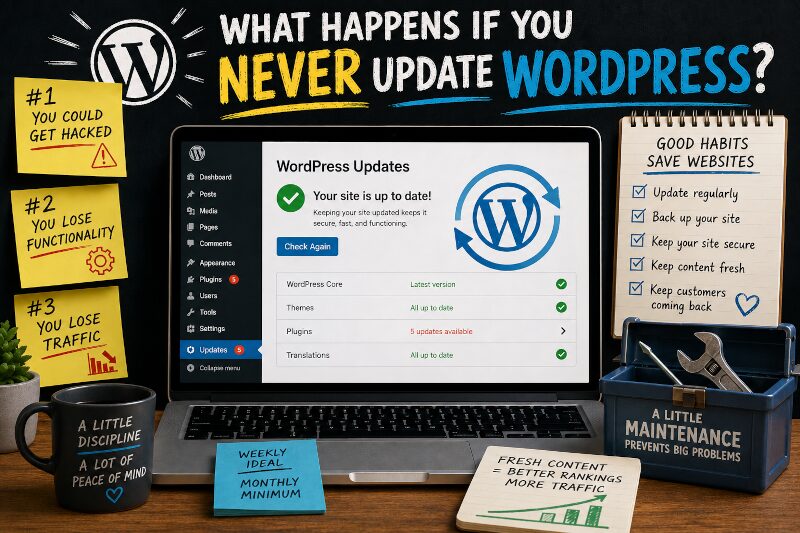
Typing that title was stressful for me. Merely uttering the words, “never update WordPress” around a WordPress expert is enough to give them the shakes. You may be thinking, “Please. I have enough to worry about. I’m not stressing over some silly little plugin update on my website.” And it’s true, as a small business owner you very likely do have more pressing matters to attend to in the moment. But those moments add up to days, weeks, months, and sometimes even years (Do I have some stories for you? You bet). Neglecting updates for too long can wreak havoc on your website. What kind of havoc? Glad you asked.
#1: You could get hacked
If you’ve never lost a website before due to a hacker, I can tell you that it’s devastating — especially if you don’t keep backups. I’ve seen small businesses fold when their site got hacked, because it was the very foundation of their business. I’m not talking about a little brochure “contact us” kind of website, I mean a full-blown eCommerce store with hundreds of customers and a ton of order data. Poof! Gone.
So how can your site get hacked just because you didn’t update it? It’s the same reason computer and phone manufacturers urge you to update as soon as one is available. The older your software is, the more prone you are to security breaches. In WordPress, hackers can find ways to infiltrate your site through plugins. The older they are, the easier it is to find a way in. It’s the same for WordPress themes and WordPress itself. Updating slams the door on hackers.
Why would someone bother hacking my site? I’m just a little guy. Because they can. That’s it. And sometimes if they can hack your site, they may be able to hack your host’s server, which could expose even more data they can use in phishing or other online scams.
If your site is backed up, then it’s much easier to come back from a hack. But chances are if you’re taking the time to back up your site, you’re also updating it. 😉
#2: You lose functionality
If you wait too long to update WordPress, you could lose functionality of a few — or a lot — of features on your site. I was once contacted by a new client who needed me to make a few small updates to her WordPress site. It seemed simple enough, but when I got into it I found that multiple plugins, themes, and WordPress itself had not been updated in almost five years. In software, that’s an eternity.
Disaster in 3…2… I was already working on her site, so I offered to do a quick update for free. Because she relied on many of them to run her site, she naturally agreed. Things went downhill from there. One of the core plugins could not be updated because the developer had changed it so much that it no longer functioned the same way. Unfortunately, their old plugin version was not compatible with the latest version of WordPress and conflicted with other plugins that could be updated. In effect, the entire layout of her home page was in jeopardy.
Now, instead of just doing a few small updates, she needed much of her site redesigned. It was an expensive lesson. And, it could have been avoided entirely if she had checked in on her site regularly.
#3: You lose traffic
Search engines favor “freshness.” Google crawls and indexes sites that update often more frequently, which helps new pages rank faster and keeps existing pages visible. Stale sites are crawled less often and can lose rankings over time.
Maybe creating regular content is beyond the scope of what you’re capable of. There’s enough to do in running a small business to keep you occupied. It’s okay if the idea of becoming a writer does not thrill you. There are options!
- Hire someone. If you can afford it, hire someone to create content on a regular basis. Or, if you already have an employee with downtime and the interest, give them the task. One caveat is that you should not hand anyone the keys to the kingdom. Keep a separate Admin account for yourself. If you part ways, you don’t want to have to go chasing down access to your own website.
- Do minimal content updates. If you have some kind of guide or evergreen content that you offer for free (and you really should), freshen ’em up every now and then. The internet doesn’t care what the content is, it only wants to know what’s new.
- Put your social media on your site. There are plugins that allow you to embed your social media posts on your WordPress site. When you post to your social media account, your website gets updated automatically. It’s a super easy, almost hands-off approach to keeping content fresh.
How often should you update?
For clients who subscribe to my maintenance plans, I update their plugins, themes, and WordPress core every week. Not only am I clicking the little update button, I’m also checking that any updates didn’t create a conflict or change something vital in the website’s layout or functionality (it happens). If it does, I can fix it right away. If you really can’t handle doing weekly updates, then I recommend doing them once per month, bare minimum.
For content updates like I outlined above, you can stick to a less frequent schedule and still get benefits. Although I would caution you that if you keep a blog, make sure the latest post isn’t from several years ago. Potential customers might assume you’re no longer in business, or not doing well.
Keeping WordPress updated regularly isn’t difficult. It requires a little discipline, but just like doing your payroll or taxes, it’s just one of those things you need to do as a small business owner.
Leave a Reply